Unfortunately, HubSpot treats forwarded emails as new incoming email conversations, so they are NOT automatically associated with the original ticket.
Example: You sent the customer an email from within the ticket (from partner.service.focus@pon.com).
The customer replied from a different email address and most likely from a new email thread (for example, they wrote a new email or replied to a forwarded message).
Since HubSpot sees this as a new incoming email thread to your support address, the following happens:
1. A new conversation is created in the Help Desk/inbox.
2. A new ticket is automatically created for this conversation (based on your channel automation).
3. And after the tickets are merged, the ticket status of the “original” ticket does not change automatically.
Good news:
You can track these tickets under “Check reply from other email” in the Help Desk. All such emails are listed there, and in most cases it’s clear at first glance that the reply belongs to an existing ticket (for example, the ticket number is in the subject line).
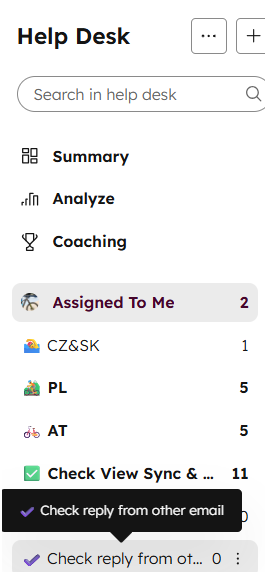
If you find your customer’s reply there, please merge the tickets. This way, the new email will also appear in the middle section of the Help Desk.
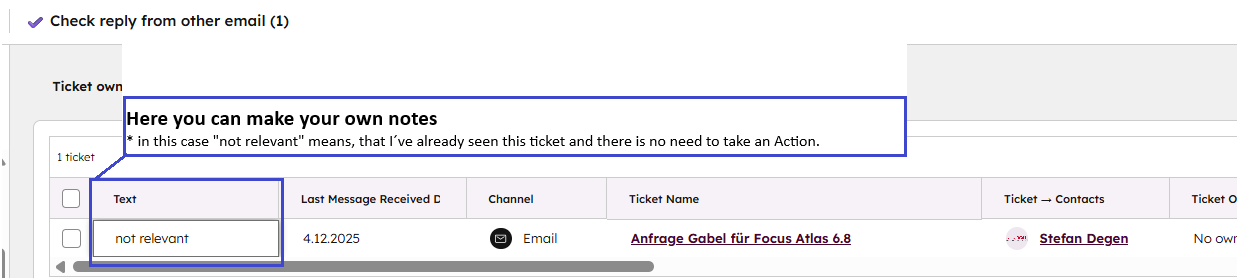
Not all tickets shown here are incorrectly closed. For example, as in this case, the customer sent an email instead of filling out the contact form in the dealer portal.
In such cases, please leave the ticket here and add a note in the TEXT column so other users know that this ticket has already been checked.